Move, resize, and copy by dragging
Drag an event to another day, pull its edge to change the time, or hold Option to copy it.
Most changes to an event’s day or time take a single drag. No need to open it.
Move
- Month and Flow: drag an event or task to another day. It keeps its time and length.
- Week, Day, and N Days: drag it to a new day and time. It snaps to 15-minute steps.
- Plan, Spreads, and List: drag it to another date.
In Week, Day, and N Days, drop a timed event on the all-day row at the top to make it all-day. Drag an all-day event down into the hours to give it a time.
In Month, you can also drag between the month and the day shown on the right.
Hold an event near the edge of the window and Across moves on to the next month, or scrolls, so you can drop it further out.
Change the length
In Week, Day, and N Days, drag the top edge of an event to change when it starts, or the bottom edge to change when it ends. The pointer turns into an up and down arrow when you’re on an edge.
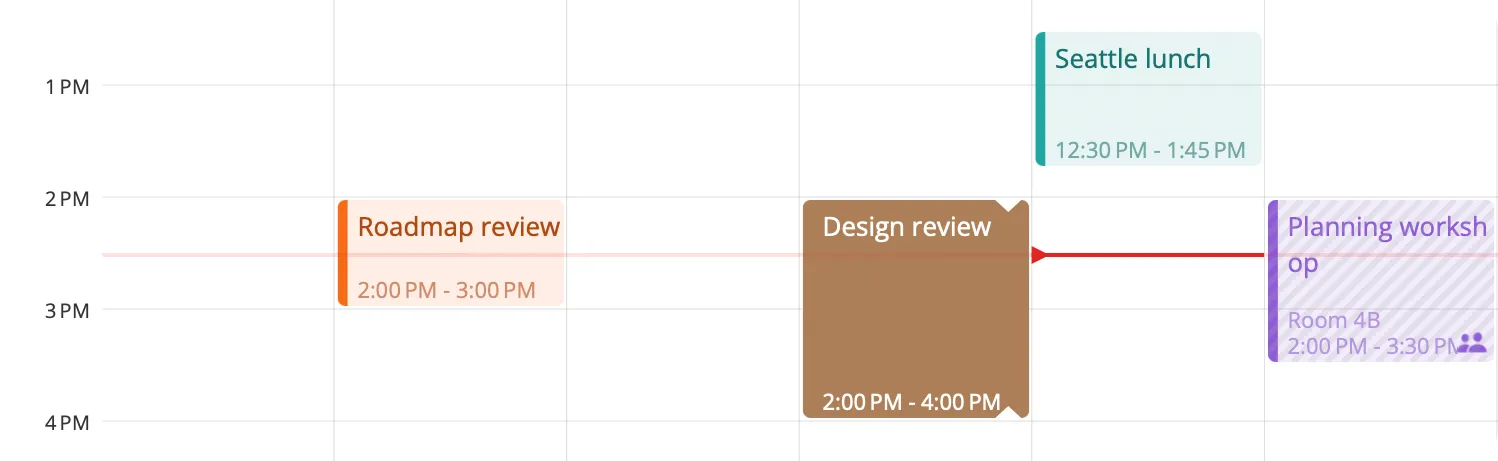
Click an event once and it fills in, with a small tab at its top and bottom right corners. The tabs give you a bigger spot to grab.
Create by dragging
- Month and Flow: drag across empty days and let go. A new all-day event opens, covering those days.
- Week, Day, and N Days: drag down through empty hours. A new event opens for that time.
Copy with Option
Hold ⌥ while you drag an event, and you’ll drop a copy instead of moving it. A + appears on the pointer. You can press ⌥ partway through the drag too.
Copies don’t repeat, even if the original does.
Hold ⌥ and drag across days in Month, Flow, or Glance Flow to highlight them instead. See Emoji, highlights, and spans.
What stays put
Some events can’t be moved because you can’t change them:
- Events on calendars you can only read, like holidays and subscribed calendars
- Invitations from someone else
- Google birthdays and out-of-office events
Moving one event in a repeating series changes only that one.
Updated November 22, 2026