Add events and tasks without the mouse
Press ⌘N, type a sentence like "Lunch with Kate Friday 12:30", and press Return. The whole flow, from the keyboard.
You never have to pick a date in a calendar or scroll through a list of times.
Add an event
- Press ⌘N. A new event opens on the day you’re looking at.
- Type what it is and when, in one line:
Lunch with Kate Friday 12:30. Across highlights the part it reads as a date and time and fills in Starts and Ends as you type. - Press Return to add it. Esc closes it without adding anything.
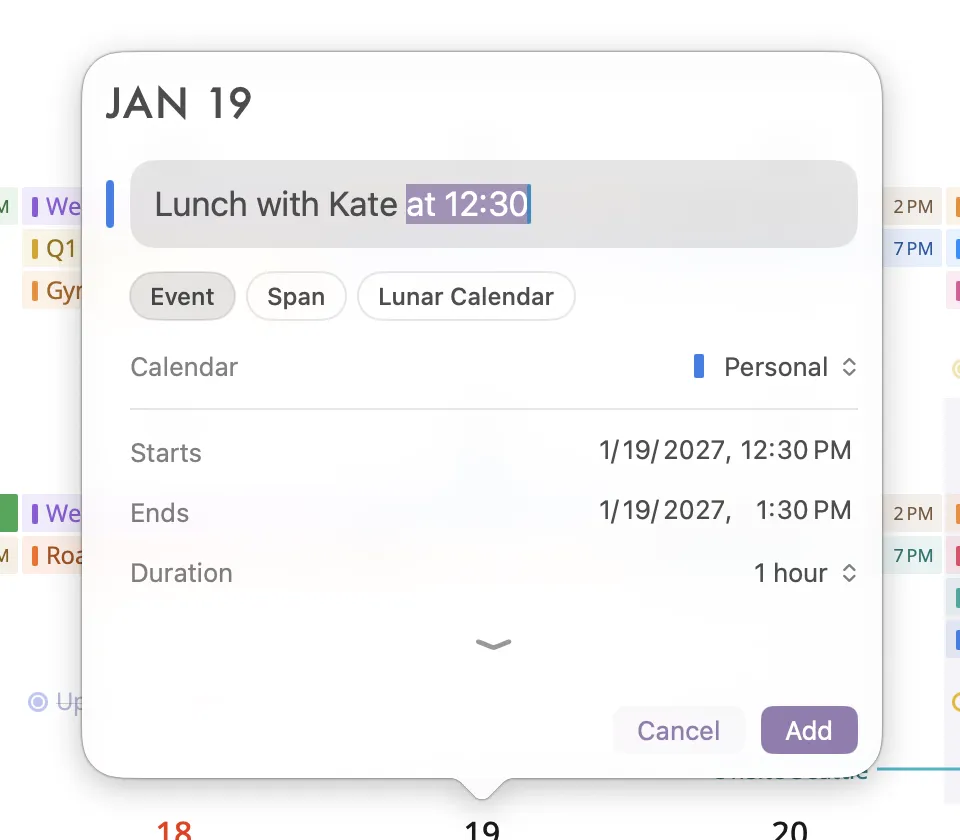
The date and time come out of the title, so the event is saved as just Lunch with Kate.
What you can type
| You type | Across adds |
|---|---|
Lunch with Kate Friday 12:30 |
Friday, 12:30 to 1:30 PM |
Design review Thursday 2-4pm |
Thursday, 2 to 4 PM |
Gym tonight at 7 |
Today at 7 PM |
Call Mom tomorrow |
Tomorrow, all day |
Trip to Tahoe Dec 27 to Dec 30 |
December 27 to 30, all day |
- With only a start time, the event lasts one hour. You can change that in Settings → New Event, Task → Default Event Duration.
- In Month view, a time alone, like
Standup 9:30, goes on the day you have selected. - To keep the date and time in the title, turn on Keep natural language in title in the same place. To type dates by hand instead, turn off Natural Language Input.
Add a task
Press ⇧⌘N for a new task and type the same way.
Renew passport Fridayis due Friday.Call the plumber tomorrow 9amis due tomorrow, with an alert at 9 AM.
New tasks go to your default list. Choose it in Settings → New Event, Task → Default Reminder List.
Keep going from the keyboard
Moving around needs no mouse either.
| Keys | What they do |
|---|---|
| ⌘T | Go to today |
| ⌘← · ⌘→ | Previous · Next |
| ⌘1 to ⌘9 | Switch view |
| ⌘F | Search |
Click an event once, and the rest works from the keyboard too.
| Keys | What they do |
|---|---|
| ← → ↑ ↓ | Select the next event in that direction |
| Return | Open it |
| ⌘E | Edit it |
| ⇧⌘C | Complete a task |
| ⌫ | Delete it |
| Esc | Clear the selection |
Every shortcut is listed in Settings → Keyboard.
Let Apple Intelligence add it
On macOS 27 with Apple Intelligence, the new event window has a third option, Quick. Type a sentence or drop in a photo, and Across turns it into an event or a task.
Updated November 22, 2026